


Sched
4.1288.00 Reviews
App Specs
- Version
- 1.62.3
- Updated On
- License
- Free
- Downloads
- 100,000+
- Developer
- Sched LLC
- Categories
- Events
- Platform
- Android
Screenshots
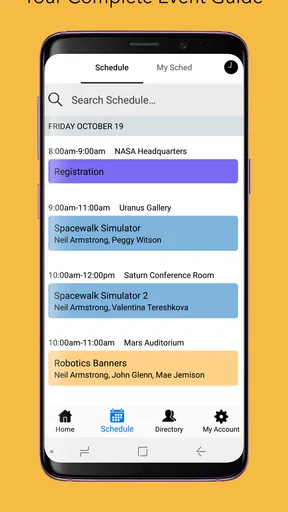
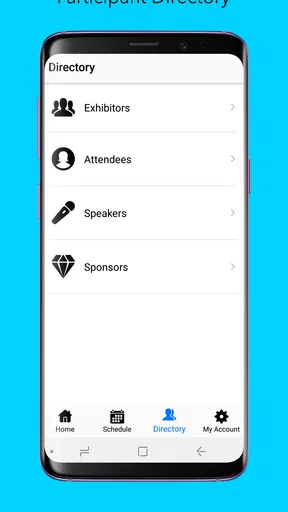
 Analysis by AppCompare
Sched works best when I treat it as a guide to a particular event, rather than as a replacement for my everyday calendar. Its appeal is practical: once an event uses the platform, I can look up the schedule and shape a personal plan around it instead of keeping every session, talk, or activity in my head. That focus makes it useful for busy gatherings, though it also means its value depends on whether the event I care about is using Sched.
A schedule is only useful if it helps you choose
At a conference or workshop, the hard part is often not finding something to attend but deciding what deserves the time. I find a personal agenda more useful than a long program viewed as one uninterrupted list. It lets me think in terms of my own day: which sessions matter most, where I have a break, and what I may need to give up if two appealing options overlap.
A small but worthwhile habit is to review the schedule before arriving, then check it again when plans change. That turns the app into a decision aid rather than something I open only while rushing between rooms. If I am going with a colleague, we can each make a plan and compare priorities beforehand; that is often more helpful than trying to negotiate every choice in the middle of a crowded event.
Where this approach differs from ordinary calendars
A general calendar is better for recurring appointments, family plans, and events that I need to create myself. Sched has a narrower job: helping attendees work with an event program that is already organized through the service. That distinction matters. I would not move my whole personal calendar into it, but I would use it alongside one when a conference schedule is dense enough to justify a separate agenda.
Compared with a printed program, an app-based schedule is easier to consult while moving around and easier to adapt when I change my mind. A paper program can still be preferable if I want a quick overview without checking a phone, or if I am conserving battery. A generic notes app is flexible, but it takes more effort to recreate a structured event program there. Sched’s advantage is strongest when the event’s own schedule is the source I need.
The trade-off behind a focused event app
The same focus creates a clear limitation: the app cannot help much with an event that is not available through Sched. Even for a supported event, a schedule is only a plan, not a guarantee that every session will fit my interests or that the day will run exactly as expected. I still need to leave room for breaks and make choices when sessions compete; a personalized agenda can make those choices clearer, but it cannot make them for me.
I also would not assume that an event schedule app is a full team-planning or invitation tool. The useful question for a prospective attendee is simpler: does the event I am attending publish its program through this service, and does having that program on my phone make my day easier? If the answer to the first question is no, a regular calendar or the organizer’s own materials may be the more dependable option.
Worth Reading Before You Choose

EA SPORTS FC Mobile 26 Is a Bigger Football Game, but It Takes Time

Flipboard Shows What News Apps Must Do Beyond the Feed

Switching to Android Auto Means Rethinking Your Driving Routine

Google Calendar Makes a Crowded Week Easier to Manage

Ludo King Makes the Most of the Minutes Between Plans

Baby Panda World Brings Quick Play to Modern Phones, but Its Game Library Feels Busy
Who will get the most from it
I would recommend Sched to people attending multi-session events who want a convenient way to browse the program and plan their own attendance. It is especially useful for someone who tends to overbook a day, forgets which session starts when, or wants to compare options before committing. First-time conference visitors may also appreciate having a personal outline instead of repeatedly scanning a full program.
On an ordinary week with a handful of appointments, I would choose a standard calendar instead. It is also not the right choice for someone expecting a universal event directory or a guaranteed way to manage every detail of attending an event. Its usefulness is tied to the event schedule it serves, so I would check that the event is supported before relying on it as my only guide.
First Impressions
When I first launched Sched, the interface struck me as clean and intuitive. I mean, who wants to navigate a scheduling app that feels like a maze, right? The app welcomes you with a straightforward dashboard, making it super easy to get started. No need to decipher a complex map just to find your way around.
What I found really neat was the color-coded calendar feature. It’s like having a visual assistant that helps you quickly distinguish between different types of events. This is especially handy if your life is a mix of professional and personal engagements. The colors are vibrant yet not overwhelming, and it’s a breeze to set them up.
Features That Stand Out
One of the standout features of Sched is its seamless integration with other platforms. Whether you’re a Google Calendar fanatic or an Outlook devotee, Sched has your back. The synchronization is as smooth as butter, ensuring that your events are always up-to-date across all devices. It's like having a personal assistant who’s always on their game.
Another cool feature is the attendee management system. If you’ve ever organized an event, you know how chaotic managing attendees can be. With Sched, you can send invites, track RSVPs, and even communicate with participants directly through the app. It’s like having your own event planning team right in your pocket.
Usability and Performance
Using Sched feels like a breeze. The app’s performance is top-notch, with no noticeable lags or crashes during my testing. And trust me, I put it through the wringer. Switching between different sections is swift, and the load times are impressively short. It's clear that a lot of thought went into making the user experience as fluid as possible.
Customization is another area where Sched shines. You can personalize your calendar view, set reminders, and adjust notification settings to your liking. It’s like having a tailor-made suit – everything fits just right.
Who Is It For?
Sched seems to cater to a wide audience. Whether you’re a busy professional, a student with a packed schedule, or an event organizer, Sched offers something valuable for everyone. The app is available for both Android and iOS, making it accessible to a broad range of users. So, no matter what device you’re rocking, you’re covered.
For those who love attending conferences or workshops, Sched offers a unique feature: it lets you browse event schedules and create your own personalized agenda. It’s like having your own custom guide to navigate through busy events.
Final Thoughts
In conclusion, Sched is a powerhouse of a scheduling app. It combines functionality with a user-friendly interface, making it a top contender in the world of time management tools. Whether you’re trying to keep your personal and professional life balanced or planning a large-scale event, Sched has got you covered.
If you’re ready to take control of your schedule and want a reliable app that doesn’t complicate things, give Sched a shot. You might just find that it’s the missing piece in your productivity puzzle.
What to check before the event
In practical terms, I would install it before the day begins, find the event schedule, and choose only the sessions I genuinely expect to attend. For example, if I have a work conference with parallel talks, I can build a realistic route through the day at breakfast rather than make rushed decisions between sessions. I would leave gaps for meals, travel across the venue, and conversations; filling every slot may look efficient on screen but can make the actual day stressful.
It is also worth treating a saved agenda as a working plan, not a promise. If a session becomes less relevant or I meet someone I want to talk with, I can revise my priorities instead of feeling obliged to follow the original sequence. That is one of the more useful ways to use a personalized program: it gives me a starting point while leaving room for the unplanned parts that often make an event worthwhile.
Practical expectations and fit
Sched is a free events app developed by Sched LLC, and its broad reach suggests it is familiar to many attendees: it has over 100,000 installs and an average rating of 4.2 from around 1,600 ratings. It is rated for Everyone. Those figures are a helpful snapshot, but I would still judge it by the event I am attending and the clarity of that event’s schedule, rather than assuming every organizer uses the same setup.
The app’s current version is 1.62.2, and it requires Android 8.0 or later. It was released on May 3, 2018, so it is not a brand-new entry in the event-app space. For me, the key decision remains whether I need an event-specific agenda: if I do, a focused tool can save repeated searching; if I simply need reminders for routine appointments, a general calendar is the more natural fit.
A measured recommendation
My overall view is positive, with one important qualification: Sched is most convincing when I am attending an event whose program is available in the app. It can make a packed day easier to understand and help me make deliberate choices, but it should not be mistaken for a universal calendar or a substitute for checking event details. I would use it as a companion to my usual planning tools, not as the place where all my life’s appointments must live.
If you have a conference, workshop, or similar gathering coming up, I think it is worth trying before you arrive and seeing whether the schedule supports the way you like to plan. If you need a single app for ordinary appointments, recurring routines, or events that are not on the service, I would stick with a general calendar. That is the honest dividing line: Sched is useful when its event-focused approach matches the day you need to organize.
Pros
- Intuitive user interface for easy navigation.
- Seamless integration with calendar apps.
- Customizable notifications for events.
- Real-time updates and changes.
- Supports multiple time zones.
Cons
- Limited offline functionality.
- Occasional sync delays reported.
- Premium features behind a paywall.
- No dark mode option available.
- In-app ads can be intrusive.
FAQs for Sched
What is Sched and what does it do?
Sched is a comprehensive event management app designed to streamline the planning and execution of conferences, workshops, and meetings. It offers features such as schedule creation, speaker management, and attendee engagement tools, making it easy for organizers to ensure a smooth event experience. Ideal for both small gatherings and large conferences, Sched provides a user-friendly platform that integrates with various devices.
Is Sched available for both Android and iOS devices?
Yes, Sched is available on both Android and iOS platforms, ensuring that users can manage their events on the go, regardless of their device. The app is optimized for mobile use, providing seamless access to all its features, including schedule updates, speaker profiles, and attendee lists, directly from your smartphone or tablet.
How user-friendly is Sched for first-time organizers?
Sched is highly user-friendly, even for first-time event organizers. Its intuitive interface guides users through every step of event planning, from creating the agenda to managing attendees. With drag-and-drop functionality and easy customization options, new users can quickly get up to speed and create professional-looking event schedules without any prior experience.
What are the key features of Sched that enhance event management?
Sched offers a range of features designed to enhance event management, including customizable event schedules, speaker and session management, attendee networking tools, and real-time updates. The app also supports virtual events with live streaming capabilities and integrates with other platforms for a cohesive experience. These features ensure that organizers can efficiently manage both in-person and virtual events.
Does Sched offer any support or tutorials for new users?
Yes, Sched provides extensive support for new users, including tutorials, FAQs, and customer service to assist with any questions or difficulties. Their website hosts a comprehensive knowledge base that covers everything from basic setup to advanced features, ensuring that users have the resources they need to fully utilize the app's capabilities.


